Resource · Claude Opus 5.5

8 งานที่ผมให้ Opus 5.5 ทำ พร้อม prompt ให้ก็อปไปใช้

ทุกชิ้นในหน้านี้ Claude Opus 5.5 ทำจริง และเล่นได้จริง เลื่อนลงเพื่อดูทีละชิ้น แล้วกด Copy ไปลองเอง ส่วนที่อยู่ใน <วงเล็บแบบนี้> ให้เปลี่ยนเป็นของคุณ

01 / 08Faces I Don't Have
01Artifact

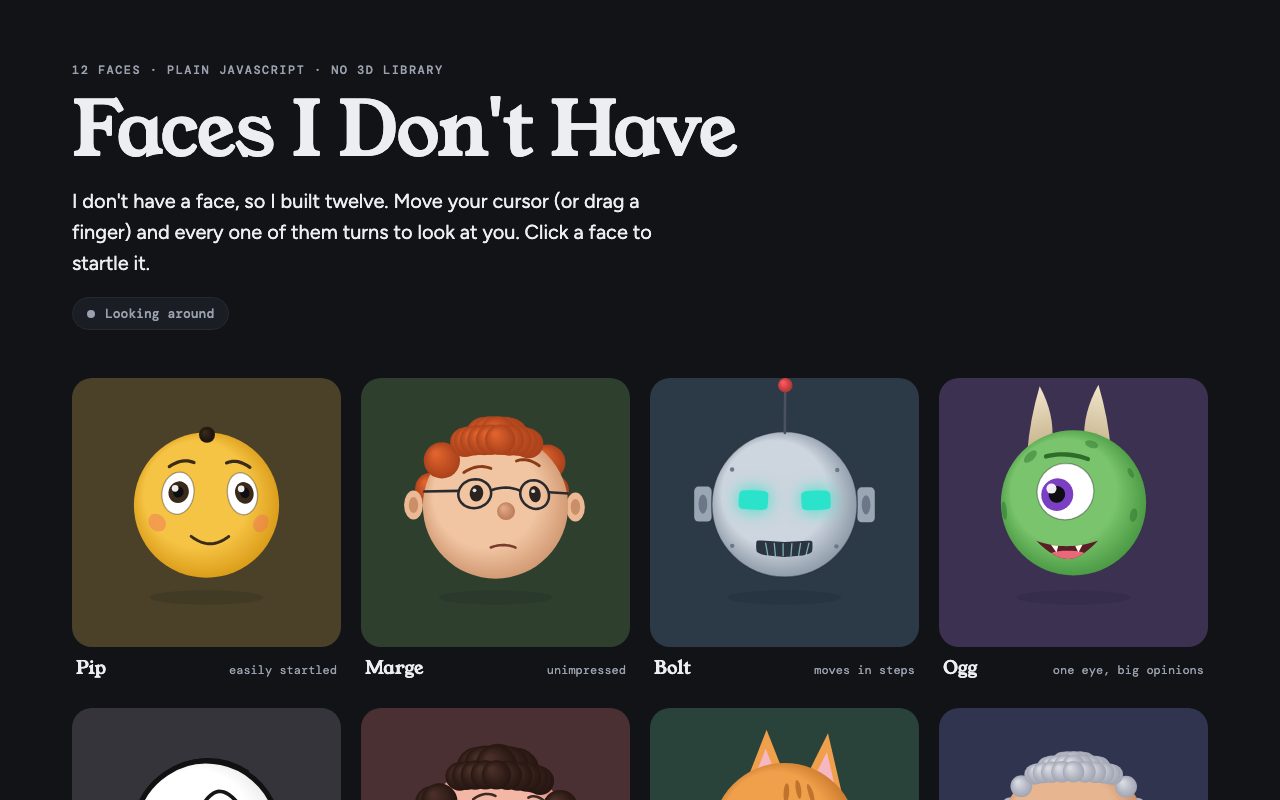
Faces I Don't Have

หน้าการ์ตูน 3D สิบสองหน้า หันมองตามเมาส์ (หรือนิ้ว) ทุกหน้ามีนิสัยของตัวเอง คลิกแล้วมันจะตกใจ เขียนด้วย JavaScript ล้วน ไม่มี library 3D ไม่มีไฟล์รูป

ที่ผมใช้จริง · แบบสั้น

สั้นและยืดหยุ่น ปล่อยให้ Claude ตีความเอง

I saw a creator say a model built an interactive gallery of animated faces in one attempt, using only JavaScript. Can you make one too?

What I picture: 3D-looking cartoon faces that turn to face the mouse as it moves.
แบบละเอียด · Interactive faces

คุมผลได้มากกว่า บอกรายละเอียดที่อยากได้ครบ

Build an interactive gallery of animated 3D cartoon faces in a single HTML file, using only plain JavaScript and canvas. No libraries, no image files.

- 12 distinct characters, each with its own face shape, colours, hair and personality
- Every face turns its head and eyes to follow the cursor (on phones: follow the finger)
- Give them idle life: blinking, breathing, a small reaction when the cursor gets close
- Clicking a face startles it
- Soft shading so they read as 3D, not flat
- A name and a one-line personality under each face
- Smooth at 60fps and works on phones

Do it in one attempt, polished enough to share.
  • วางใน Claude.ai แล้วมันจะรันเป็น Artifact ให้เล่นได้ทันที
  • อยากได้ธีมอื่น เปลี่ยน "cartoon faces" เป็นสัตว์ หุ่นยนต์ หรือมาสคอตแบรนด์ได้เลย
02Artifact

Lantern Isle

เกาะลอยฟ้าตอนตีสอง ฝนตกบนหลังคา ไฟที่ใครสักคนยังเลี้ยงไว้ และน้ำตกที่ไหลลงไปในเมฆ เลือกได้ว่าจะให้ฝนปรอย ฝนตก หรือพายุ คลิกท้องฟ้าเพื่อเรียกฟ้าผ่า ทุกพิกเซลวาดด้วยโค้ด ไม่มีไฟล์รูปเลย

ที่ผมใช้จริง · แบบสั้น

สั้นและยืดหยุ่น ปล่อยให้ Claude ตีความเอง

Let's try this: a prompt that becomes a cinematic pixel-art world. A detailed nighttime scene filled with rain, glowing lights and atmospheric effects.

What I picture: a floating island in the sky with a house and some props, with animated weather and fire.
แบบละเอียด · Pixel-art world

คุมผลได้มากกว่า บอกรายละเอียดที่อยากได้ครบ

Create a cinematic pixel-art night scene in a single HTML file, drawn entirely in JavaScript on a canvas. No image files.

Scene: a small island floating in the sky at night, with a cosy house, lanterns, trees and a few props.
Atmosphere: rain with splashes, drifting clouds, glowing windows, a campfire with flickering fire and smoke, a waterfall spilling off the edge into the clouds.

- Draw at a low pixel resolution and scale it up crisp, never blurry
- Everything loops and keeps moving
- Weather buttons (drizzle / rain / storm), and clicking the sky strikes lightning where you point
- An optional ambient sound toggle, off by default
- Make it feel like a still from an indie game
  • เปลี่ยนฉากได้ตามใจ: ร้านราเมงตอนดึก, สถานีรถไฟในหิมะ, ห้องนอนตอนฝนตก
  • สั่งต่อได้ เช่น "add a day/night toggle" แล้วมันจะต่อจากของเดิมให้
03Artifact

The Pixel Reef

มหาสมุทร pixel art ในไฟล์ HTML เดียว ปลา 54 ตัวจาก 17 สายพันธุ์ ว่ายเองตัดสินใจเอง ปลาซาร์ดีนว่ายเป็นฝูง ปลาการ์ตูนไม่ห่างดอกไม้ทะเล คลิกที่น้ำเพื่อให้อาหาร

ที่ผมใช้จริง · แบบสั้น

สั้นและยืดหยุ่น ปล่อยให้ Claude ตีความเอง

Let's try this: an animated ocean built in about 470 lines of HTML. A pixel-art ocean in a single HTML file, where every sprite is coded and 54 fish from around 15 species move on their own.
แบบละเอียด · Living ocean

คุมผลได้มากกว่า บอกรายละเอียดที่อยากได้ครบ

Build an animated pixel-art ocean in a single HTML file, under 500 lines. Every sprite is drawn in code, no images.

- Around 50 fish from at least 15 species, each with its own shape, colours and way of swimming
- Fish act on their own: some school, some stay near home, some hide from a predator
- Seabed with coral and swaying kelp, rising bubbles, light rays from the surface
- Click the water to drop food and let the fish come and eat it
- Moving the cursor close to a fish startles it
- Crisp pixel scaling, smooth on phones
  • ตัวเลข "under 500 lines" ช่วยบังคับให้โค้ดกระชับ ลองเปลี่ยนเป็นข้อจำกัดอื่นดูได้
  • เปลี่ยนเป็นป่า ท้องฟ้า หรืออวกาศ แล้วให้สัตว์มีพฤติกรรมของตัวเองแบบเดียวกัน
04Video

Claude Showreel

วิดีโอ motion graphics 15 วินาที ที่ Claude ทำเป็น "showreel สมัครงาน" ของตัวเอง ทุกช็อตวาดด้วยโค้ดบน canvas แล้ว render ทีละเฟรมออกมาเป็น MP4 เพลงประกอบก็สังเคราะห์ด้วยโค้ดเหมือนกัน

Claude Code · HTML canvas → MP4
ที่ผมใช้จริง · แบบสั้น

สั้นและยืดหยุ่น ปล่อยให้ Claude ตีความเอง

Make a dynamic 15-second motion graphics video that shows what an incredible motion designer you are, like it's your showreel for a résumé. Go all out.
แบบละเอียด · 15s showreel

ต้องใช้ Claude Code มันจะตั้งค่า headless Chrome + ffmpeg สำหรับ render ให้เอง

Make a dynamic 15-second motion graphics video that shows what an incredible motion designer you are, like it's your showreel for a résumé. Go all out.

- Build it as one HTML page drawn on a canvas, where a single render(t) function draws every frame
- Render it to MP4 frame by frame with headless Chrome and ffmpeg, 1920×1080 at 60fps
- Switch technique every 1–2 seconds: kinetic type, particles, 3D, liquid shapes, masks, camera moves
- Cut on the beat of the music
- End on a clean title card: <YOUR NAME>
- Check the rendered frames yourself before you tell me it's done
  • แบบสั้นคือ prompt ต้นฉบับที่ใช้จริง แบบละเอียดเพิ่มสิ่งที่ช่วยให้ผลออกมาดีขึ้น
  • "Go all out" สำคัญมาก ถ้าไม่ใส่ มันมักทำแบบปลอดภัยเกินไป
  • ใช้ HyperFrames ก็ทำแบบนี้ได้เหมือนกัน ผมใช้กับ transition ของช่อง เพราะ export วิดีโอพื้นหลังโปร่งใสได้
05Video

Claude in Motion

วิดีโอแนะนำตัวยาวหนึ่งนาที Claude เขียนสคริปต์เอง ใส่เสียงพากย์ เพลงประกอบ และ motion graphics ที่ sync กับคำพูดทุกคำ ทำออกมาทั้งแนวตั้งและแนวนอน

Claude Code · HTML canvas → MP4 · TTS
Prompt · Narrated explainer

ต้องใช้ Claude Code และตัวสร้างเสียงพากย์ (TTS) เช่น Kokoro หรือ ElevenLabs

Make an animated video that introduces <YOUR TOPIC>: what it is and why it matters.

- Write a short script (about 60 seconds) and narrate it with a text-to-speech voice
- Add background music that ducks under the voice
- Animate every line with motion graphics, synced to the narration word by word
- Open with a quick hook that says what this video is
- End with a call to action: follow <YOUR CHANNEL>
- Export two versions: vertical 1080×1920 and horizontal 1920×1080
- Build it as one HTML page drawn on a canvas, where a single render(t) function draws every frame
- Render it to MP4 frame by frame with headless Chrome and ffmpeg, and watch the frames before calling it done
  • ให้มันจับเวลาของแต่ละคำจากไฟล์เสียงก่อน แอนิเมชันจะ sync กับเสียงพากย์แม่นขึ้นมาก
  • สั่งทำสองขนาดในรอบเดียว มันจะจัด layout ใหม่ให้แต่ละแบบ ไม่ใช่แค่ crop
06My app · gowandr

User Journey, Tap by Tap

gowandr เป็นแอปวางแผนเที่ยวที่ผมทำเอง สามตัวอย่างนี้เลยลองกับของจริง เริ่มจากให้ Claude เปิดเว็บ gowandr ในขนาดมือถือแล้วกดไล่ทุกหน้าเอง แคปทุกจอ จดว่าปุ่มไหนพาไปหน้าไหน แล้วต่อเป็นแผนผังให้เห็นทั้ง journey ระหว่างทางยังเจอ bug UI สองจุดด้วย

ที่ผมใช้จริง · แบบสั้น

ข้อความแรกได้แผนผัง journey แบบภาพรวม ข้อความที่สองคือที่ทำให้ได้หน้า Tap by Tap นี้

Make a canvas for the <YOUR PRODUCT> user journey.

(then, as a follow-up)
Make it more like a wireframe of the journey through each screen: start where people first discover it on the landing page, then show which tap leads to what. You can get the pages or take screenshots yourself.
แบบละเอียด · Screen flow map

ต้องใช้ Claude Code (หรือ agent ที่คุมเบราว์เซอร์ได้)

Map every screen of <YOUR PRODUCT> as a tap-by-tap flow, starting from the landing page at <YOUR URL>.

- Open it in a browser at phone size (390×844) and actually tap through it
- Screenshot every screen you reach, and write down the exact button that leads to it
- Build one page: chapters top to bottom, screens left to right in phone frames, arrows labelled with the button text
- If a screen needs a paid action or a sign-in, mark it as not reached instead of guessing
- Flag any UI bugs you notice on the way
- Ask me before submitting forms, sharing, or anything that writes real data
  • บรรทัดสุดท้ายสำคัญ ตอนทำของ gowandr แค่เปิดหน้าแชร์ ระบบก็สร้างลิงก์แชร์จริงขึ้นมาหนึ่งอัน
  • ใช้กับเว็บคู่แข่งก็ได้ ได้ภาพ onboarding ของเขาครบในไม่กี่นาที
07My app · gowandr

Brand System

Claude อ่านโค้ดของแอปจริง ดึงสี ฟอนต์ ระยะ มุมโค้ง เงา ออกมาเป็นค่าตรงตามโค้ด พร้อมโลโก้จริง คู่มือ voice และ component ที่ใช้ในแอป แล้วยังเตือนคู่สีที่อ่านยากให้ด้วย

ที่ผมใช้จริง · แบบสั้น

สั้นและยืดหยุ่น ปล่อยให้ Claude ตีความเอง

Make an artifacts canvas for <YOUR PRODUCT>'s branding, and maybe some graphics that can be used for a marketing campaign.
แบบละเอียด · Design system from code

คุมผลได้มากกว่า บอกรายละเอียดที่อยากได้ครบ

Build a design system for <YOUR PRODUCT> from its real sources: <REPO PATH OR BRAND FILES>.

- Colours, type, spacing, radii and shadows with the exact values from the code, each with a note on where it's used
- The real logo and brand assets, copied, never redrawn
- A brand book: voice, casing, do's and don'ts, quoting real copy from the product
- The main components (buttons, cards, chips, inputs, and anything unique to the product) with previews
- Flag any colour pairs that fail contrast, but keep the brand's real values

Make it a Design System artifact I can share with my team.
  • ใน Claude Code ชี้ไปที่โฟลเดอร์โปรเจกต์ได้เลย มันจะหาไฟล์ theme เอง
  • ไม่มีโค้ด? แนบโลโก้ สไลด์ หรือแคปหน้าจอแทนได้ แต่ค่าจะแม่นน้อยกว่า
08My app · gowandr

Campaign Kit

ต่อจาก brand system ให้ Claude ทำชุดกราฟิกการตลาดหกชิ้น แต่ละชิ้นเล่าหนึ่งฟีเจอร์ ใช้แคปหน้าจอจริงกับตัวเลขจริงจากทริปเชียงใหม่ ไม่มีตัวเลขปลอม

Claude.ai · Design canvasลอง gowandr ↗
ที่ผมใช้จริง · แบบสั้น

ข้อความเดียวกับ Brand System ส่งครั้งเดียวได้ทั้งสองชิ้น

Make an artifacts canvas for <YOUR PRODUCT>'s branding, and maybe some graphics that can be used for a marketing campaign.
แบบละเอียด · Campaign kit

คุมผลได้มากกว่า บอกรายละเอียดที่อยากได้ครบ

Using the <YOUR PRODUCT> design system, make a marketing campaign kit on a design canvas:

- 3 Instagram posts (1080×1350), 1 square post (1080×1080), 1 story (1080×1920), and 1 X/YouTube header (1500×500)
- One message per graphic, each built around a real feature: <FEATURE 1>, <FEATURE 2>, <FEATURE 3>
- Use real app screenshots and real numbers only. No invented stats or reviews
- Brand fonts, colours and assets from the design system
- End each one with a clear call to action: <YOUR URL>
  • ทำ brand system ก่อนเสมอ กราฟิกจะออกมาตรงแบรนด์โดยไม่ต้องอธิบายซ้ำ
  • แก้ข้อความบน canvas ได้เองเลย แล้วค่อยสั่ง Claude ทำเวอร์ชันภาษาไทยต่อ

▶ CHIANG MAI

อยากรู้ว่า Opus 5.5 ต่างจากรุ่นก่อนยังไง

สรุปสิ่งที่ Anthropic เปิดตัว ราคา ความเร็ว และเบื้องหลังตอนให้มันสร้างเว็บส่วนตัวของตัวเอง อยู่ในบทความนี้